
Remoteer
End-to-end encrypted • Direct, or through our own relay

Remote desktop for Windows, Mac and the browser.

Remoteer connects you to any Windows PC or Mac from the app or a browser, phones included. End-to-end encrypted, the person at the computer decides, and nothing is tracked.

Launch Web Client Windows (.EXE) macOS (.DMG) iOS Coming soon Android Coming soon Linux Coming soon

Windows 10 or 11 (64-bit) · macOS 13 or later, Apple silicon · the web client runs in any current browser

Up to 60 fps, pixel-sharp text Encrypted WebRTC (DTLS-SRTP) Unattended Remote Access Bidirectional File Transfer User Guide →
Remoteer — Web Client
Open full screen
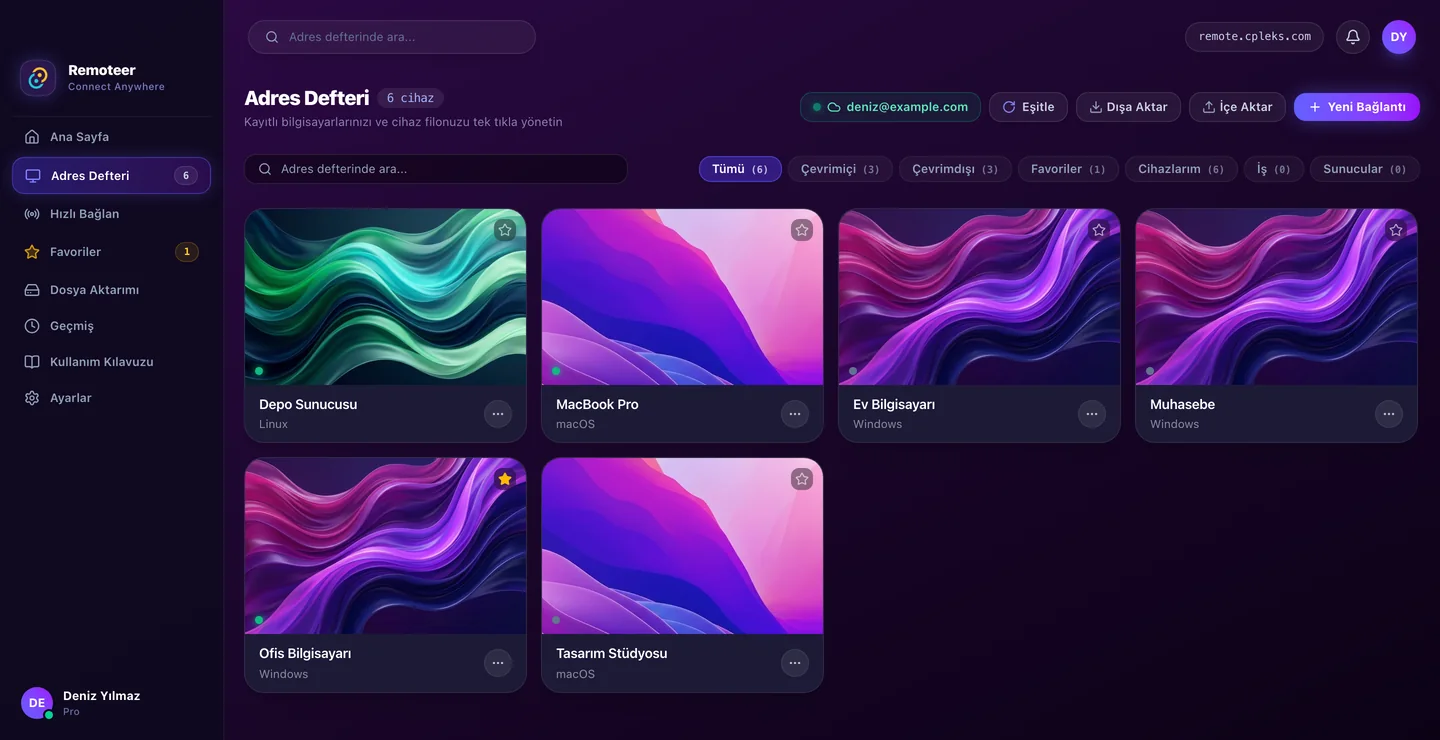
Remoteer web client: the address book with saved Windows and Mac computers, online status, groups and favourites

What Remoteer is

Remoteer is a remote desktop app for Windows and macOS, with a web client that runs in a browser, phones included. You connect to another computer by its 9-digit ID: the person there accepts, or you enter its PIN or unattended password. Remoteer is made by Oyuncaklı Şeyler in Antalya, Türkiye.

At a glance

Pricing

Start free. Pro is paid once a year and can be cancelled any time.

Free
$0
  • ✓15 minutes per session
  • ✓Connect from the web client and the desktop app
  • ✓File transfer, voice calls and chat
  • ✕No address book
Start free
Pro
$20 / year
14 days free trial
  • ✓Sessions without a time limit
  • ✓50 devices in the address book
  • ✓First-aid links: a five-minute link, one click to connect
  • ✓Everything in Free
Start free trial

Sales terms · Refunds · Terms · Privacy

Step-by-Step Documentation

How to Use Remoteer?

Complete guide for connecting, accepting incoming requests, managing address books, file transfer, and security preferences.

The full illustrated guide →
1

Connecting to a Remote PC

  • • Get ID: Ask the remote computer for their 9-digit Device ID (e.g. 842 190 412).
  • • Quick Connect: In the desktop app or Web Client, type the ID and click Connect.
  • • Approval, PIN or password: The session starts when the person at that computer accepts, or when you enter its PIN or unattended password.
2

Accepting Incoming Connections

  • • Share Your ID: Provide your permanent 9-digit ID to the support agent or teammate.
  • • Choose permissions: In the request, choose Full access, Standard or View only (View only is preselected).
  • • You Are in Control: Terminate the session at any moment by clicking the red End Session button.
3

Address Book & 1-Click Access

  • • Save Devices: Save computers with friendly names (e.g. Office iMac, Home Workstation).
  • • Unattended password: Save a computer's unattended password and connect with one click, even when nobody is there.
  • • Groups and favourites: Put each computer in a group (Work, Personal, Servers or Family), filter by group and mark favourites; synced across your devices.
4

Menus & Multi-Monitor

  • • Home: This computer's ID, its PIN (Renew makes a new one) and its connection status.
  • • Display & Window Picker: On multi-monitor setups, select Display 1, Display 2, or a specific window to stream.
  • • History: Timestamped records of past sessions with quick reconnect shortcuts.
5

File Transfer & Security

  • • Dual-Pane Explorer: Manage files side-by-side between local and remote machines.
  • • Any file size: Files go end-to-end encrypted between the two computers: directly, or through our relay when the network needs it.
  • • During a session: Press Send in the session bar to open the transfer panel.
6

Settings & Security

  • • Unattended password: Set a strong password to connect while nobody is at the computer.
  • • Permissions one by one: Turn mouse and keyboard, clipboard, files and system shortcuts on or off separately, even during a session.
  • • Runs in the background: Close the window and Remoteer keeps running, ready for incoming requests.

Questions and answers

What is Remoteer?

A remote desktop app for Windows and macOS with a web client for browsers and phones, made by Oyuncaklı Şeyler in Antalya, Türkiye. You reach a computer by its ID; the person there accepts, or you use its PIN or unattended password.

Is Remoteer free? What does Pro cost?

There is a Free plan. Pro costs USD $20 a year plus local taxes, after a 14-day free trial, and adds sessions without a time limit, an address book of 50 computers synced between your devices, and first-aid links. Paddle sells Pro as merchant of record, and you can ask for a full refund within 14 days of every payment.

Which platforms does it run on?

Windows 10 and 11 (64-bit, x64) and macOS 13 or later on Macs with Apple silicon (M1 or later). Without installing anything you can connect from a current Chrome, Edge, Safari or Firefox at remote.cpleks.com/app, also on a phone, where your finger works like a trackpad. Linux, iOS and Android apps are not available yet.

Is the connection encrypted?

Yes. Screen, keyboard and mouse, clipboard, files, chat, calls and tunnel traffic are encrypted end to end between the two computers (WebRTC: DTLS and SRTP). When the computers cannot reach each other directly, our own relay passes on packets it cannot read. PINs and passwords are checked between the two devices, so our server never learns them.

Do I need to open ports or use a VPN?

No. Remoteer makes outbound connections only. On a strict network, allowing TCP 443 and TCP 3478 to remote.cpleks.com is enough; with outbound UDP allowed too, most sessions connect directly. The network and firewall page lists everything.

Network & firewall →

Can I connect when nobody is at the computer?

Yes. On that computer, turn on Unattended access in Settings → Security and set a password. Your own computers signed in to the same account also let you in without a code. The computer must be on with a user signed in; on Windows, Remoteer cannot yet show the sign-in screen, the lock screen or UAC prompts, or send Ctrl+Alt+Del.

Does the person I help need an account?

No. A computer that only receives help needs just the app, which shows its ID and PIN. First-aid links (Pro) let the person you help connect with one click; a link is valid for five minutes.

Who makes Remoteer, and where is data kept?

Oyuncaklı Şeyler Ltd. Şti., a company in Antalya, Türkiye. Our servers are hosted by Contabo in Germany. Screens, files and chats are never stored on them; the server keeps a record of who connected to which device and when for 90 days. No ads, analytics or tracking, and the website sets no cookies.